"AI is going to take your job" is one of those phrases that spreads because its simple, scary, and partly true. But its also misleading. Jobs are not single tasks. They are bundles of activities: planning, communicating, interpreting context, making judgement calls, dealing with messy edge cases, and being accountable when something goes wrong.
AI is very good at automating parts of work. In some roles, those parts are most of the role, so headcount can shrink. In other roles, AI mostly removes admin and busywork, making people more productive. And in a third category, AI creates new work (governance, implementation, training, quality control, security, compliance, and change management).
So the question "Will AI take your job?" is better asked as:
This article breaks down what is happening in plain terms, what is realistic in the next 12 to 36 months, and practical steps you can take whether you are an employee, a leader, or a business owner in Australia.
Most companies do not wake up one morning and replace an entire department with a model. Real-world automation happens through:
That last point matters. AI does not just automate tasks, it pushes organisations toward more standard, repeatable work. The more standard the work, the easier it is to automate. The messier and more human it is, the harder it is to replace.
To judge your own risk, you need a realistic picture of where AI shines today.
In Australia, compliance and privacy requirements can slow adoption in government, healthcare, finance, and education, especially where sensitive data is involved. That does not stop AI, but it changes how it is implemented (private deployments, stricter governance, more human review).
Instead of thinking in job titles, think in task profiles. Here are some broad categories.
These roles will not vanish overnight, but they are likely to change quickly. A common outcome is that fewer juniors are hired and expectations rise for those who are hired. The entry-level ladder can get steeper because AI now does some of the apprenticeship tasks people used to learn on.
Even these roles will be reshaped. But the replacement narrative is usually less accurate than productivity and skill expectations increasing.
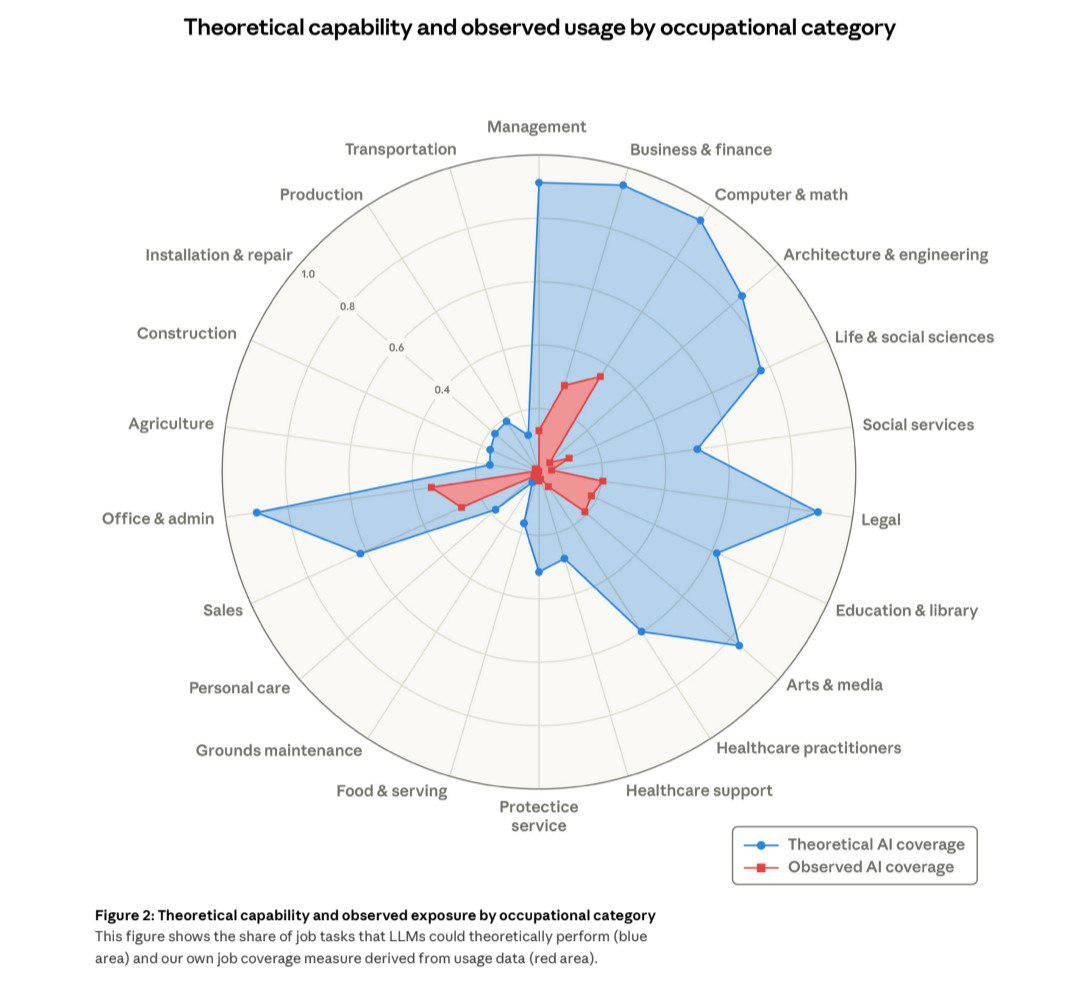
The image in this article comes from a chart released by Anthropic: Theoretical capability and observed usage by occupational category. It is a great reminder that there is a difference between what AI could do in theory and what people are actually using it for at work.
In the chart, the theoretical coverage (blue) looks very high across several white-collar categories such as legal, office and admin, business and finance, and computer and math. But the observed usage (red) is much smaller and clustered. That gap is the story: capability is not the same thing as adoption.
Even when AI is capable, adoption is often limited by privacy and data access, the cost of mistakes, integration with existing systems, and the need for a human to be accountable for decisions.
If you want to dig into the details, the Anthropic write-up is here: https://www.anthropic.com/research/labor-market-impacts
Example: A support team uses an AI agent to handle routine tickets. The team still exists, but the easiest cases no longer require a human. That can reduce hiring or shrink the team over time.
Example: A marketing coordinator spends less time drafting copy and more time on campaign strategy, data interpretation, and quality control. The job is still there, but the skill mix shifts upward.
Example: A small business owner uses AI to generate first drafts of proposals, policies, and customer communications, meaning they do not need to outsource as much. This does not replace a job in a headline way, but it reduces demand across the market.
Of these, pattern 3 is the quietest and most widespread. It is also why the topic feels confusing: the economy can change without a dramatic "robots fired everyone" moment.
There are real brakes on automation:
The result is that adoption is uneven. Some teams move fast and gain a competitive edge. Others lag, not because AI does not work, but because implementing it well is a business transformation project.
No job is permanently safe. But most people are not replaced by AI, they are replaced by someone using AI plus a redesigned process. That distinction is empowering, because it means you can respond.
Here is a quick self-assessment. Your role is more at risk if most of your week involves:
Your role is more resilient if most of your week involves:
If you are somewhere in the middle (most people are), the goal is to shift your work toward the second list.
Start by using AI for low-risk drafts: emails, agendas, meeting notes, summaries, checklists, and first drafts of documents. The skill is not getting AI to write. The skill is reviewing quickly and improving the output.
Think of it like having an intern who is fast but occasionally wrong. You would not send their work unreviewed. But you can move faster with a good review process.
Most productivity gains come from repeating what works. Keep a simple doc with:
This turns AI from a novelty into a reliable tool, and it makes you visibly more efficient at work.
If AI makes the technical and drafting parts cheaper, the value shifts to:
These are career stabilisers. They matter across industries.
If you are running a team, the best approach is neither panic nor denial. It is a measured implementation plan.
Pick one department and list the top recurring tasks. Estimate:
Then classify tasks into:
Even small businesses should decide:
This is not red tape, it is how you avoid reputational damage, compliance issues, or internal confusion.
Fear-based rollouts fail. The best results happen when teams understand AI as a productivity tool with clear boundaries, and when you reward good review habits and process improvements.
A simple rule helps: AI can draft, but humans approve. Over time, as trust and quality improve, you can expand automation where it makes sense.
AI will reduce the cost of producing certain kinds of work: basic text, routine analysis, standard customer replies, simple coding tasks, and information retrieval. That will reshape hiring, especially at the entry level, and it will change what good performance looks like.
But the world still needs people who can take responsibility, make decisions, manage risk, build relationships, and deliver outcomes when the situation is messy.
If you want a simple takeaway: AI will take tasks. People who adapt will take the better jobs.
Ready to assess which parts of your workflow can be safely automated and which should stay human-led? Get in touch with us to map a practical AI adoption plan that improves productivity without increasing risk.