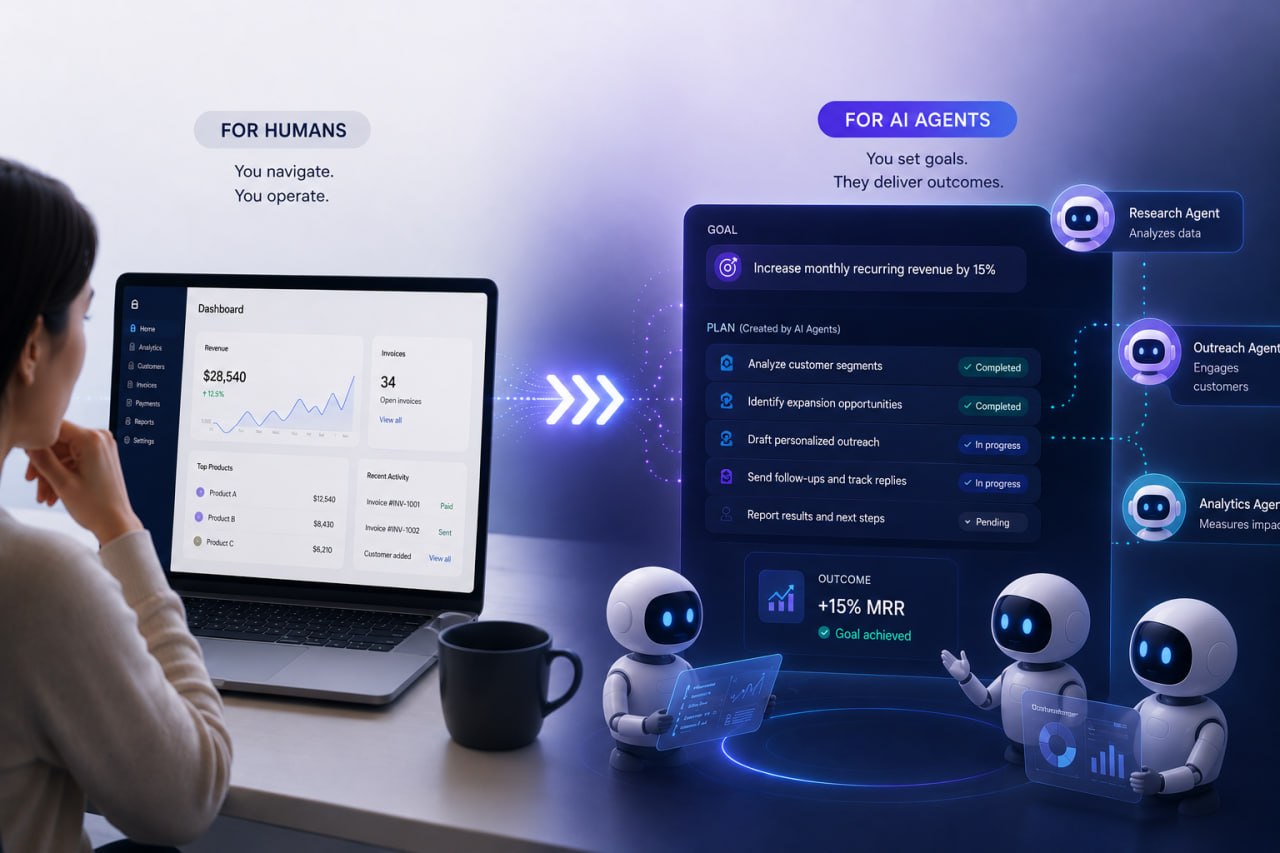
For most of the web's history, the interface contract was simple. A website or application existed for a human being to look at, understand, and operate. We designed navigation menus for people, buttons for people, forms for people, dashboards for people, and onboarding flows for people. The browser was the window, and the person behind it was the operator.
That assumption is starting to weaken.
Not because humans are disappearing, and not because every software product is suddenly turning into an autonomous machine-to-machine system, but because a second kind of user is arriving. That user is the AI agent. It does not browse the web in quite the same way a person does. It does not care much about visual hierarchy, brand tone, or clever layout decisions. It wants structure, explicit actions, predictable state, and clear permissions. It wants a website, SaaS platform, or workflow to tell it what can be done, rather than forcing it to guess.
I do not think it is wise to pretend this shift is already complete. It is not. We are still early. Many of the standards, tools, and product patterns are immature, and some of them may never become dominant. But the direction is real enough to matter. If you build SaaS products, workflow-heavy systems, or customer-facing platforms, it is worth paying attention. For businesses already investing in custom software development, this is starting to look less like a novelty and more like a real design consideration.
The web may be moving toward a split model: one interface layer for humans, and another for agents.
Today, most AI agents interact with websites through a fairly awkward process. They inspect the DOM, read visible text, infer intent from labels, simulate clicks, type into fields, wait for state changes, and try not to get lost. In some cases, they go even further down the stack and rely on screenshots, visual interpretation, or accessibility trees to figure out what is on the page.
That approach can work, but it is brittle.
A button label changes, the page layout moves, a modal appears unexpectedly, a calendar widget behaves differently than expected, or a form field has hidden rules that are obvious to a person but unclear to a machine. Suddenly a task that seemed straightforward becomes unreliable. This is why browser automation has always had a fragility problem. It often depends less on stable intent and more on the current shape of a page.
That matters even more as SaaS products become richer and more operationally important. A modern platform is not just a collection of screens. It is often the place where approvals happen, records are created, reports are generated, claims are lodged, customer workflows are managed, and internal actions are triggered. As a result, web app development is no longer only about what a human can click through comfortably. It is increasingly about whether the underlying actions are structured clearly enough to be performed reliably.
This is the context in which the idea of an agent-facing web starts to make sense. The problem is not that humans no longer matter. The problem is that human interfaces are a poor native protocol for software agents.
One of the more interesting signals here is WebMCP, which Google published through Chrome in May 2026 as a proposed web standard for exposing structured tools to AI agents. The core idea is straightforward. Instead of making an agent infer what a form, widget, or workflow is for, the site can declare capabilities explicitly.
In practical terms, that means a website or application could expose machine-readable actions such as searching inventory, starting a claim, submitting an application, filtering results, populating fields, or navigating a known process. It can attach schemas, clarify inputs and outputs, and expose current state in a way an agent can reason about more reliably.
That is a meaningful shift. It changes the interaction model from "look at this interface and work it out" to "here are the actions available on this page, here is how to call them, and here is what they return." If that pattern matures, it reduces dependence on brittle click-and-type automation and turns parts of the web into something closer to a tool surface than a visual guessing game.
That does not mean websites become APIs in disguise, or that design stops mattering. Quite the opposite. The best version of this future is one where the human interface stays polished and useful, while a second layer exists underneath it for agents to operate safely and efficiently. That is also why this conversation overlaps with both custom web development and broader software development strategy. It is no longer only about how a page looks. It is also about what the product exposes.
Not every website needs to care about this immediately.
If you run a simple marketing site, brochure site, content publication, or small service business website, agent readiness is probably not the first thing that should be keeping you awake. Clear messaging, sound performance, conversion quality, SEO, mobile usability, and trust still matter more.
But SaaS products are different.
SaaS products are full of actions. Search this. Export that. Create a record. Trigger an approval flow. Compare options. Open a ticket. Reconcile data. Update a user. Generate a report. Move through a multistep onboarding process. Attach a file. Configure a rule. Those are not just visual experiences. They are operational capabilities.
Once an AI agent becomes a practical operator inside business workflows, those capabilities stop being exclusively human-operated. A customer might ask an agent to submit a warranty claim, reconcile invoices, complete onboarding, compare software options, or gather evidence across multiple systems. An internal team member might ask an agent to extract metrics, prepare support cases, or move information from one operational surface to another.
At that point, the question for a SaaS product is no longer just "is the interface easy for humans?" It also becomes "can an agent carry out important tasks without creating unnecessary friction, failure points, or security risks?" That is a product design question, a systems question, and increasingly a business question.
I suspect the most resilient SaaS products will not choose between human-first UX and agent-ready workflows. They will build both.
The human layer still matters because people remain accountable. Humans make judgments, handle exceptions, understand nuance, and decide whether the workflow itself still makes sense. They care about brand trust, readability, usability, onboarding, and support. None of that disappears.
But the agent layer matters because software is becoming more operationally dense. Businesses do not just want dashboards anymore. They want progress. They want work to move. They want repetitive handling reduced. They want software that can be instructed, delegated to, and integrated into larger workflows.
For teams involved in SaaS product development, that has practical consequences. A cleaner action model, explicit permissions, stable identifiers, predictable workflow state, and machine-readable inputs and outputs may become as important as visual polish. The old assumption that a user interface is mainly a visual surface may not hold as strongly in the next generation of products.
That is especially relevant in custom software development projects where the product is tightly bound to a business process. If the underlying workflow is complex, repetitive, and integration-heavy, then an agent-ready architecture may eventually create leverage that a purely human-facing interface cannot.
There is another reason this discussion is surfacing now. More web applications are starting to behave less like static pages and more like operating environments. They contain dense workspaces, live state, collaborative editing, diagramming, simulation, design tooling, and embedded interaction models that feel closer to software canvases than to classic websites.
That does not mean the ordinary web is disappearing into canvas. Most business websites still live happily in normal HTML. But it does mean some of the most advanced SaaS environments are becoming harder for both humans and agents to interpret if everything depends on visual rendering alone.
That is why Chrome's HTML-in-Canvas work is interesting in parallel with WebMCP. It points to a broader tension in modern interface design. Rich interfaces want the flexibility and performance of canvas-style environments, but the web also needs semantics, accessibility, and structural legibility. Agents have a similar need. They do not just need pixels. They need declared meaning.
For teams doing sophisticated web app development, this matters because the next interface challenge may not be simply "how do we make this screen look better?" It may also be "how do we preserve enough structure that humans, tools, accessibility systems, and agents can all operate safely?"
There is an easy way to talk about this trend badly, and it is to frame agent readiness as if it only means convenience. It does not. It also means a larger attack surface.
If websites and SaaS products begin exposing more structured capabilities to agents, then those capabilities become part of the security boundary. The questions get sharper very quickly. Which actions are safe to expose directly? Which require confirmation? Which require narrow scopes, rate limits, or step-up approval? Which actions need a visible audit trail? Which should be reversible? Which should remain human-only?
That matters because AI agents are not just vulnerable to ordinary implementation mistakes. They can also be manipulated through bad context, poisoned memory, misleading instructions, or malicious content embedded in the environments they traverse. The more operational power an agent has, the more careful the surrounding system design needs to be.
So the agent-facing web, if it becomes real, cannot just be about capability discovery. It also has to be about boundaries. The best implementations will probably look less like unrestricted autonomy and more like structured delegation with clear policy controls.
This is not a call for every business to redesign its website around AI agents. Most should not.
But if you are running or planning SaaS products, internal platforms, workflow tools, portals, or customer-facing systems with a lot of operational actions, there are useful questions to ask now:
Even if WebMCP itself never becomes the dominant standard, those are still good software design questions. They push teams toward better structure, clearer permissions, and more deliberate system thinking.
That is why I see this less as a prediction about one protocol winning and more as a signal about where software design may be heading. As AI becomes more capable of operating tools, the products that are easiest to delegate to may gain an advantage over the ones that can only be clicked through manually.
If you are thinking about SaaS product development, custom software development, or web development in a world where agent-ready workflows may become more important, get in touch with us. We help businesses design and build software that works in the real world, including customer-facing systems, internal platforms, and custom web development projects that need to balance usability, flexibility, and long-term technical leverage.